How Much Storage You Actually Need
Model files are bigger than most people expect. Here is how to size storage correctly and why drive speed matters as much as capacity.
Why storage catches people off guard
Most hardware guides for local AI talk about RAM and CPU and barely mention the drive. That's a mistake - model files are large, you'll want to try more than one, and drive speed directly affects how long you wait every time a model loads into memory.
Getting storage wrong means either running out of space faster than expected, or sitting through slow model loads on every single restart.
Sizing it correctly
The rough rule of thumb: a model at common quantization needs about as many gigabytes as it has billions of parameters, give or take. A 7-8B model runs 4-5GB. A 13B model runs 7-8GB. That adds up fast once you're trying a few different models to compare.
A worked example makes this concrete. Say you keep three models around for comparison - llama3.2 (about 2GB), qwen2.5-coder:7b (about 4.5GB), and mistral (about 4GB) - that's roughly 10.5GB for models alone. Add the OS (10-20GB), Docker plus the Open WebUI image (a few GB), and your actual chat history and any RAG documents, and you're comfortably under 50GB total for a real, working setup. The rest of a 512GB drive is headroom for trying new models without deleting old favorites.
If you ever want to see exactly what's eating space rather than trusting the estimate above, Ollama's models directory is where to look. On Mac, that's ~/.ollama/models. On Linux, the standard install runs Ollama as a system service under its own ollama user, not your own account, so the real path is /usr/share/ollama/.ollama/models - not ~/.ollama/models, which would just be empty. On Windows, it's %USERPROFILE%\.ollama\models.
If you do outgrow internal storage down the line, an external NVMe drive is the simplest fix - fast enough that model loading barely suffers, without opening up the machine.
A two-minute cleanup when space gets tight
Do not go hunting through Ollama's model folders and delete files by hand. Let Ollama keep its own catalog consistent:
- Run
ollama lsto see every downloaded model and its size. - Keep the one or two models you actually use. If you are unsure, leave it installed for a week rather than guessing.
- Remove an unused download with
ollama rm <model-name>, then runollama lsagain to confirm it is gone.
ollama stop frees RAM or VRAM for a running model; ollama rm frees the model's disk space; neither command deletes Open WebUI chats or documents. Manage those separately inside Open WebUI. What Happens to Your Data explains where each one lives.
Removing a model is not a commitment. You can download it again later with ollama pull <model-name>, so keeping only the models you use is usually the cleanest beginner setup.
Speed matters as much as size
An NVMe SSD and a SATA SSD can list the exact same capacity and cost close to the same amount, but they are not equivalent for this use case. NVMe drives connect directly over faster lanes and load a multi-gigabyte model file into memory noticeably quicker than SATA.
This matters most the first time you switch models in a session - Ollama has to read that model off disk before it can respond. On a slow drive, that pause is very noticeable. On NVMe, it's barely there.
What actually goes wrong
The drive fills up faster than expected
This usually isn't the model files themselves - it's trying several models "just to see," forgetting to remove the ones you didn't keep using. Check what's actually installed:
ollama list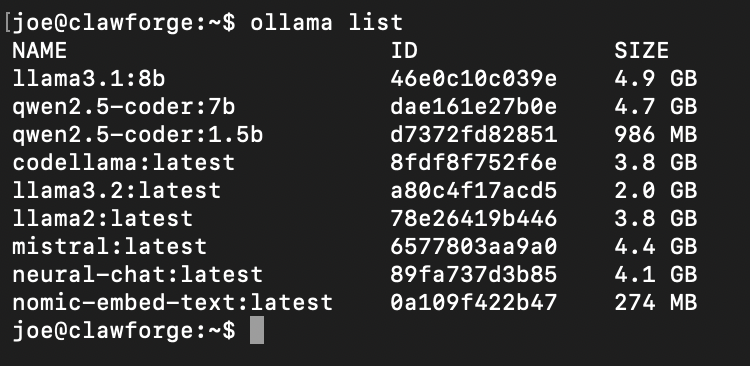
A real ollama list output - this is how fast the sizes add up once you're comparing a few models.
Remove anything you're not using with ollama rm <model-name> - it's a one-line re-download if you want it back later. Already completely out of space and something's actively breaking because of it? See Your Disk Suddenly Filled Up for the reactive version of this.
Model loading feels slow even with a "fast" drive
Double check the drive is actually running in NVMe mode and not accidentally configured or throttled down. This is more common on budget hardware than people expect, and it's worth confirming once rather than assuming.
Common questions
Can I run local AI off an external drive?
Do I need to keep every model I try?
Go deeper
This guide covers one solid path. Here's where to go if you want something different.
Changelog
- 2026-09-13: Added a simple model cleanup routine that separates freeing memory, freeing model storage, and deleting chat history.
- 2026-08-31: Corrected the Linux Ollama model path - it runs as a system service under its own account, not yours.
Written from hands-on security operations experience. More about this site →